Aceit Toolbar
Aceit Toolbar is built to make manual accessibility testing easier. It is designed to complement the manual reviews you run in Aceit, and to make day-to-day work simpler for anyone working with accessibility in web based interfaces.
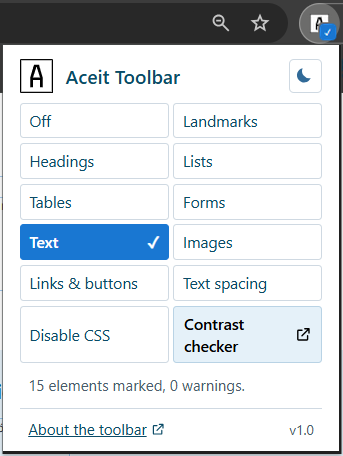
One click in the toolbar reveals how a page is structured: landmarks, headings, lists, tables, form controls, text, images, and links. You can also apply WCAG 1.4.12 text spacing or switch off all CSS to see the page without styling.
Features
The toolbar bundles the inspections you typically need during a manual review:
- Landmarks, headings, lists, and tables
- Form controls, text, images, and links and buttons
- Apply WCAG 1.4.12 text spacing with a single click
- Turn off all CSS to examine reading order and structural content
- Shortcut to the Aceit contrast checker
Every mode marks elements directly on the page with clear colours and labels, and warns about common issues such as skipped heading levels, missing alt text, or tables without header cells.
Install the extension
Aceit Toolbar works in Chrome, Edge, Vivaldi, Opera, and Firefox. You can install Aceit Toolbar here:
- Chrome Web Store — for Chrome, Vivaldi, and Opera
- Microsoft Edge Add-ons
- Firefox ADD-ONS
Get in touch if you want information and help with security-clearing the tool in your organisation.
Built with security at the core
Aceit Toolbar is developed with security and privacy in mind. The extension does not collect, store, or share any user data, and makes no network requests. All code runs locally in your browser.
- Minimal permissions - active tab only, no access to other sites
- No remote code - everything lives inside the extension and can be reviewed as-is
- No bundler, no runtime dependencies - the files in the repository are the files the browser runs
- Never modifies the page DOM - every overlay lives inside an isolated Shadow DOM
That way your security team can review the code and decide on rollout inside your organisation on their own terms.
Privacy policy
Aceit Toolbar does not collect, store, or transmit any user data. The extension reads the DOM of the tab you are actively inspecting - and only after you have explicitly clicked the extension icon and selected an inspection mode.
- No data collection. No personal information, browsing history, location, keystrokes, or other user activity is collected.
- No network requests. The extension makes no HTTP requests. All processing happens locally in your browser.
- No storage. The extension uses no cookies, no localStorage, no sessionStorage, and no IndexedDB databases.
- No telemetry. No analytics or tracking services are included.
- Minimal permissions. The extension requests only the activeTab and scripting permissions, which activate only when you click the extension icon.
All inspection activity stays local to the tab you chose to inspect. The extension does not share data with third parties.